More than 150 million people use GitHub. Developers created more than 230 new repositories every minute last year, and there are 4.3 million AI projects on the platform.
Most of those users are still developers. But the profile is shifting.
Using GitHub for marketing has become increasingly popular. Teams are now building tools that audit pages against briefs, surface campaign anomalies every morning, and turn ICP research into ad variants, without touching a line of code.
That’s a fundamentally different relationship with the platform, and it’s worth understanding why it’s happening now.
TL;DR
GitHub works as shared, version-controlled infrastructure for AI marketing work, not just code. Marketing teams use it to store prompts, briefs, ICP profiles, tone-of-voice docs, and workflow exports so tools like Claude Code can read that context directly instead of re-explaining it in every chat. As of 2025, GitHub has more than 180 million developers and 4.3 million AI-related repositories on the platform.
A working marketing repo needs four pieces: a CLAUDE.md file describing the project, a skills folder of task-specific instructions, an agents folder that chains skills into ordered sequences, and a context folder holding your ICP, messaging, and brand voice. Set it up once and every workflow you build afterward reuses that context instead of starting from zero.
Table of contents
- TL;DR
- GitHub isn’t a code repository anymore. It’s an operating system for AI work.
- The repository structure that actually works
- Why most AI marketing work doesn’t compound
- Where to start: Repos built for marketers
- The build sequence
- FAQ
- What is GitHub used for in marketing?
- Do I need to know how to code to use GitHub for marketing?
- What is a CLAUDE.md file?
- What should a marketing GitHub repository include?
- Can I use GitHub with AI tools other than Claude Code?
- How is a GitHub repo different from a shared Google Doc for storing prompts?
- Anyone can prompt. Build an AI marketing system that scales.
GitHub isn’t a code repository anymore. It’s an operating system for AI work.
GitHub is where developers store and version-control code. That’s still true, but it includes a lot more than code.
In practice, a GitHub repository (or repo) is a project folder. Inside it, you can store prompts, briefs, ICP profiles, tone-of-voice documentation, scoring rubrics, workflow exports, markdown files, CSVs—anything the project needs to run.
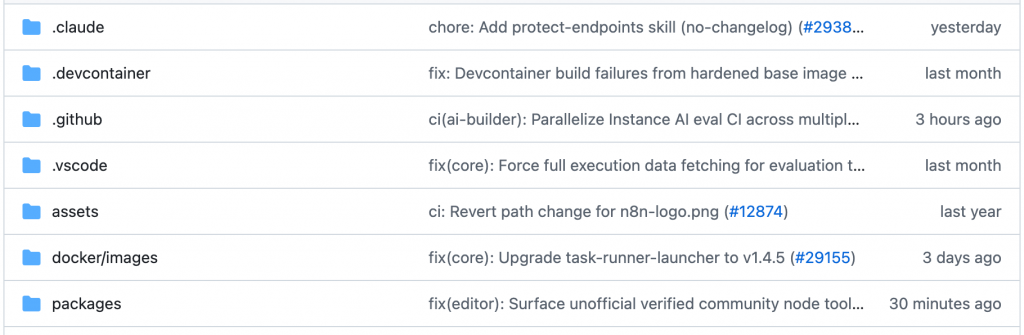
When AI tools like Claude Code or Codex connect to that repo, they read those files as context. They know the business, standards, and criteria, which means you don’t have to re-explain yourself every time you start a task.
That’s the unlock. Not the code, but the context.
Three concepts make this work:
- Commits are saved changes with a history: who changed the prompt, when, and what the previous version looked like.
- Branches allow for organized parallel experimentation: lets you test a new version of a workflow without breaking the version that’s currently running.
- READMEs are the built-in operational manuals: It’s the first thing anyone (or any AI) reads when they open the repository and explain what the project does.
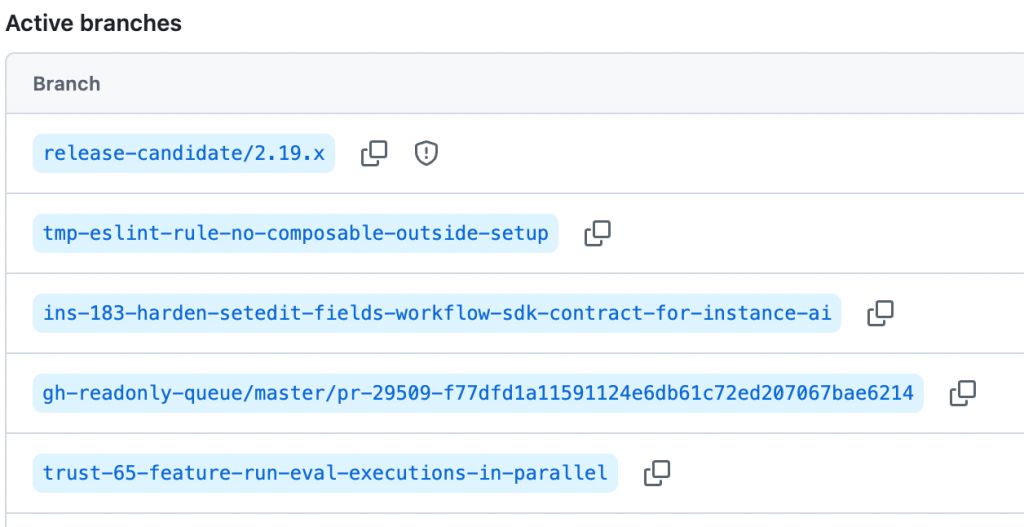
That’s the full primer. You don’t need more than this to start.
The repository structure that actually works
The marketers using Claude Code most effectively have landed on a folder structure that separates what to do from how to do it from what to do it with. It looks like this, and it’s worth copying directly.
The repo has four main components.
| CLAUDE.md | CLAUDE.md is the entry point—the file Claude reads first. It describes how the repo is structured, what each folder contains, how the different pieces relate to each other, and what conventions to follow. Think of it as the onboarding doc for the AI. Without it, Claude is guessing. With it, every run starts from the same shared understanding. |
| Skills | Skills live in a /skills folder, each in its own subfolder with a SKILL.md file. A skill is a self-contained instruction set for one specific task: write an ad variant in a specific format, score a lead against defined criteria, and audit a landing page against a brief. Each skill knows exactly what inputs it needs and what output it produces–that’s its primary focus. |
| Agents | Agents live in an /agents folder as flat .md files. An agent doesn’t contain any prompts. It contains a sequence: an ordered list of skills to run, in what order, and why. The agent points to skills. Skills point to context. The prompts never leave the skill files, which means the same skill can be reused across multiple agents without duplicating a single line of instruction. |
| Context | Context lives in a /context folder. This is where the business knowledge lives: the ICP profile, the messaging framework, the positioning doc, the brand voice guidelines. This is what makes outputs aligned with the business instead of generically competent. |
Here’s a practical example of how teams are using GitHub for marketing flows:
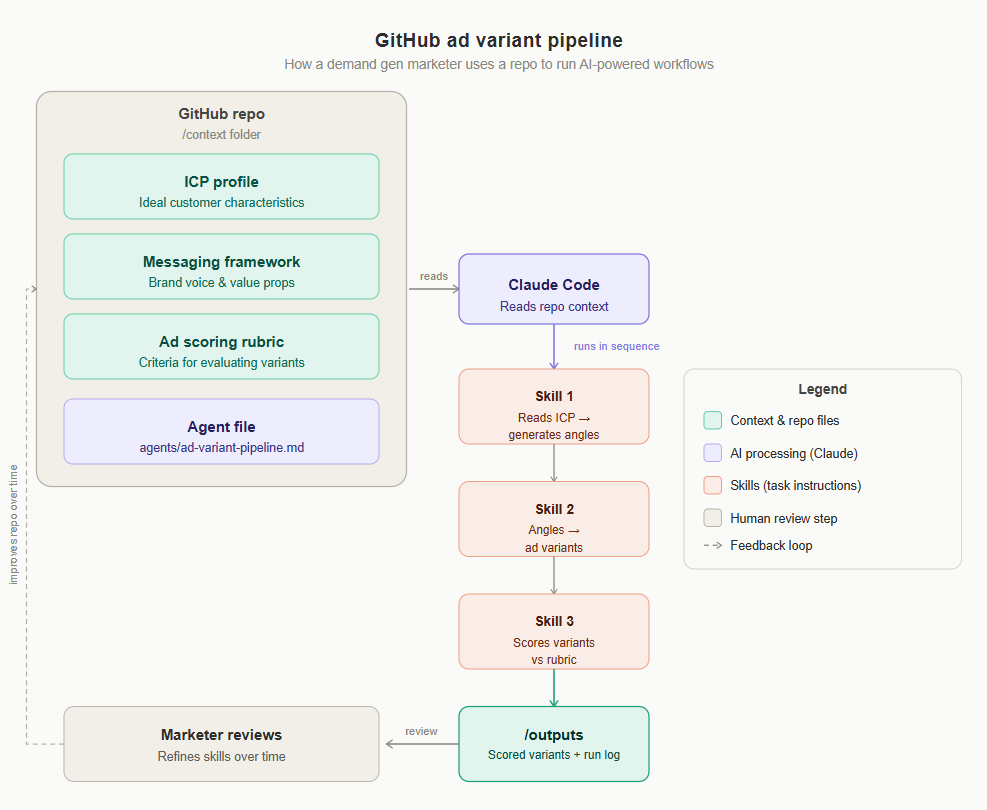
- A demand gen marketer stores their ICP profile, messaging framework, and ad scoring rubric in /context.
- An agent called agents/ad-variant-pipeline.md runs three skills in sequence:
- One reads the ICP and generates angles.
- One turns angles into ad variants.
- One scores each variant against the rubric.
- Claude reads each skill file in order, writes output to /outputs, and logs the run.
- The marketer reviews results.
- The repo keeps a record of every run, and the skills improve over time.
Why most AI marketing work doesn’t compound
Productivity that lives in one person’s knowledge base isn’t leverage; it’s a single point of failure.
One person builds a great prompt for auditing landing pages. It lives in their Notion. Nobody else uses it. When they leave, it’s gone. Another person figures out a Claude Code marketing workflow for turning customer interviews into campaign angles. It runs in their chat history: untraceable, unrepeatable, and unimprovable.
When the infrastructure for your AI work is a chat window and a doc, you can’t build on it. There’s no version history, no shared context, and no way to test improvements without risking the working version.
GitHub solves this structurally. The repo is the system. Anyone on the team can open it, read the README, understand how the skills chain together, run an agent, and contribute improvements, without starting from scratch or asking the person who built it.
The compounding effect matters here. A skill that runs 50 times gets refined. A context file that gets updated with new ICP research makes every downstream output sharper. An agent that gets a new skill added handles a broader range of tasks.
The work accumulates, and the system gets smarter. That’s a significantly different trajectory than “we’re all getting faster at writing.”
Where to start: Repos built for marketers
You don’t need to build from scratch. The GitHub ecosystem already has marketers sharing production-ready repo structures.
- The marketing toollist repo: This one doesn’t include skills or agents, but instead offers a curated list of marketing tools across different use cases.
- Corey Haine’s marketing skills repo has more than 26,000 stars and covers CRO, copywriting, SEO, analytics, and growth engineering. It’s one of the most-referenced starting points for marketers new to Claude Code.
- Michael Sitarzewski’s agency agents repo goes broader — 90,000+ stars — with skills and agents across marketing, project management, and design. Useful if you’re building workflows that cross functional lines.
These repos are worth exploring before you build anything custom. Read the README first. It tells you exactly what’s included, how the skills relate to agents, and what you’d need to adapt for your own context.
You don’t need to master GitHub to start. You need to make one decision: stop storing your AI workflows in places that don’t accumulate.
The build sequence
- Create a free GitHub account and set up your first repo. Call it marketing-workflows or something equally unambiguous. Initialize it with a README that describes what you’re building.
- Write your CLAUDE.md file. Describe your marketing context: what the business does, who the ICP is, what the brand voice sounds like, and what standards matter. This becomes the foundation every future skill pulls from.
- Convert one existing prompt into a SKILL.md file. Pick your most-used prompt — the one you paste in every week. Give it its own folder under /skills, wrap it in the skill format, and document what input it needs and what output it produces.
- Connect Claude Code to the repo. Once it’s reading from the repo, you stop pasting context manually. Claude finds it.
- Fork one of the repos above and adapt a skill to your context. Don’t reinvent what’s already been refined. Start with someone else’s skill, swap in your ICP and brand voice, and run it.
The whole setup takes a few hours, and unlike the prompt you saved in a Google Doc, this one is findable, improvable, and shareable with the next person on your team.
FAQ
What is GitHub used for in marketing?
Marketing teams use GitHub to store and version-control the things AI tools need to do good work: prompts, campaign briefs, ICP profiles, tone-of-voice documentation, scoring rubrics, and workflow exports. Instead of that context living in scattered chat histories or personal docs, it lives in one repository that any team member (or AI agent connected to it) can read directly.
Do I need to know how to code to use GitHub for marketing?
No. Creating a GitHub account and repository requires no coding. The core actions a marketer needs, creating files, writing Markdown documents, and connecting a tool like Claude Code to the repo, don’t require programming knowledge. Coding skill helps for advanced automation, but it isn’t a prerequisite to start.
What is a CLAUDE.md file?
CLAUDE.md is a Markdown file placed at the root of a repository that tells an AI agent what the repo contains and how it’s organized: its purpose, structure, and conventions. It functions as an entry point, so an AI tool like Claude Code reads it first and understands the project’s context before doing any work.
What should a marketing GitHub repository include?
A working marketing repo has four core components: a CLAUDE.md file describing the project, a skills folder of self-contained instruction sets for specific tasks, an agents folder that sequences those skills into repeatable workflows, and a context folder holding business knowledge like ICP profiles, messaging, and brand voice.
Can I use GitHub with AI tools other than Claude Code?
Yes. GitHub itself is tool-agnostic; it stores files and version history regardless of which AI assistant reads them. Claude Code is the tool referenced throughout this post because it’s built to work directly with a repository’s files and structure, but the underlying GitHub setup (CLAUDE.md, skills, agents, context) isn’t exclusive to it.
How is a GitHub repo different from a shared Google Doc for storing prompts?
A shared doc has no version history for individual edits, no way to run parallel experiments without affecting the live version, and no built-in structure for separating instructions from context. GitHub’s commits track every change with history, branches let you test a new prompt or workflow without breaking what’s already working, and a clear folder structure (skills, agents, context) keeps instructions and business knowledge organized instead of buried in one long document.
Anyone can prompt. Build an AI marketing system that scales.
Keeping up with AI can feel like a second job.
There’s always another tool to test, workflow to learn, or new capability you’re supposed to understand, while your actual marketing work still needs to get done.
So instead of giving you more AI content to consume, we built a cohort around actually building the systems.
Six weeks of building, not just learning
Each week, you’ll get focused prep matched to your level, then join a 90-minute live workshop where we build together.
You’ll apply it to your own work during the week, with access to us and the community when you get stuck. On Friday, you’ll have the chance to demo what you made.
Expect around 1 to 1.5 hours a day.
