You already know competitors are targeting category keywords—it’s baseline and relatively easy to monitor. What most paid search teams don’t have visibility into is who’s bidding on their brand terms.
Not their category but their name, and it happens more than you’d expect.
Competitors, resellers, comparison sites, and new entrants you haven’t started tracking yet. They all show up on your branded SERPs, siphon clicks from high-intent searches, and your analytics tells you nothing because you were never looking for it in the first place.
We built a competitor ad intelligence tool to fix this: first for category keywords, then extended it to branded monitoring after Nick Christensen, Head of Growth at AppSumo, pointed out the missing layer.
Here’s what we built, why it works, and how you can replicate it.
Table of contents
- The real bottleneck isn’t insight. It’s time.
- Build the workflow: From SERP to structured insight in one go
- Don’t stop at generic keywords—track who’s bidding on your brand
- What the AI layer actually does (and where it earns its keep)
- Potential stumbling blocks in competitive ad monitoring
- Getting started: How to operationalize keyword and brand monitoring in your workflow
- Make competitive intelligence part of your campaign infrastructure.
The real bottleneck isn’t insight. It’s time.
When our performance marketing manager started working with this tool, his first instinct was to use it for ad copy inspiration and creation. Afterall that’s what it was built for.
But he found a more valuable use case almost immediately.
Before launching a new campaign, he ran the target keywords through the tool and discovered that Salesforce and LinkedIn were already aggressively bidding on several of them.
That one data point changed the campaign strategy entirely.
It was clear that, in some cases, the search intent wasn’t strong enough to justify the effort, and the keyword competitiveness simply didn’t make sense for us to proceed. So, some keywords ended up being dropped, while others were reframed. The tool helped the team avoid walking into a budget war they couldn’t win.
That’s the actual value of competitive ad intelligence done right. Beyond ad copy inspiration, it provides positioning insights before a single dollar is spent.
The problem is that getting to that insight used to require a painful manual process. Query by query. Tab by tab. You’d surface some patterns, miss others, and never feel confident you had the full picture.
AI-powered tooling eliminates that bottleneck.
Build the workflow: From SERP to structured insight in one go
The stack is deliberately lean. Two APIs, one interface builder, one AI layer. No enterprise contract required.
Here’s the core setup:
- SearchAPI (or SerpApi): Pulls real-time Google Ads results per query. Both offer limited free searches monthly—enough to prototype without committing budget.
- Lovable: Builds the interface and connects the APIs without requiring you to write a full codebase from scratch.
- OpenAI API (GPT-4o mini works fine here): Handles the AI analysis layer, including pattern recognition, messaging synthesis, and competitive positioning summaries.
The workflow logic:
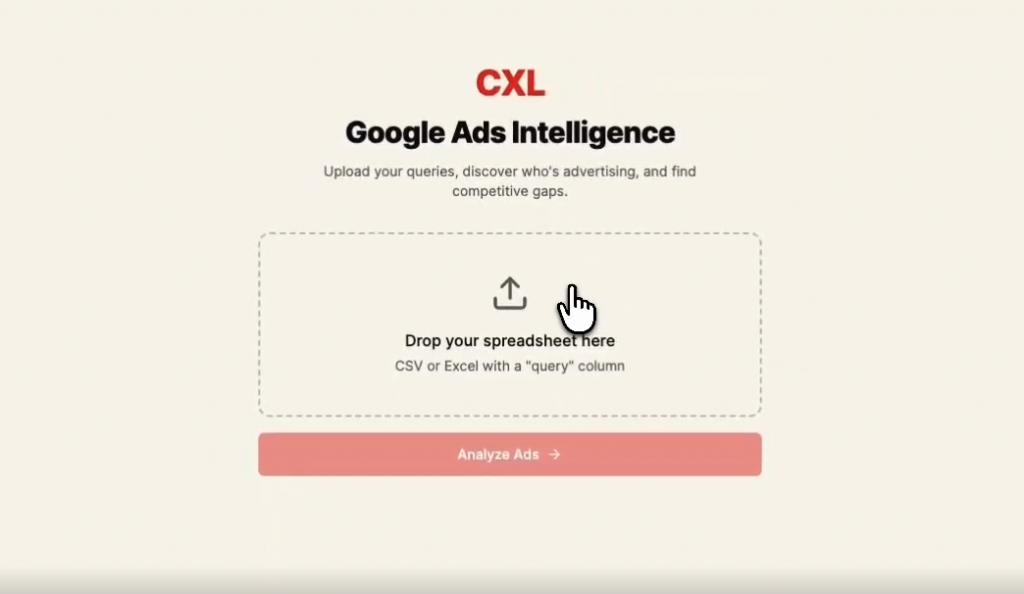
You upload a CSV of search queries. The tool fires each query at the SERP API, captures the ad results (headline, description, brand, and URL), then passes the structured output to the AI layer for pattern analysis.
The dashboard then aggregates everything: how many unique advertisers showed up, which queries are most contested, what messaging angles they’re running, and where the whitespace is.
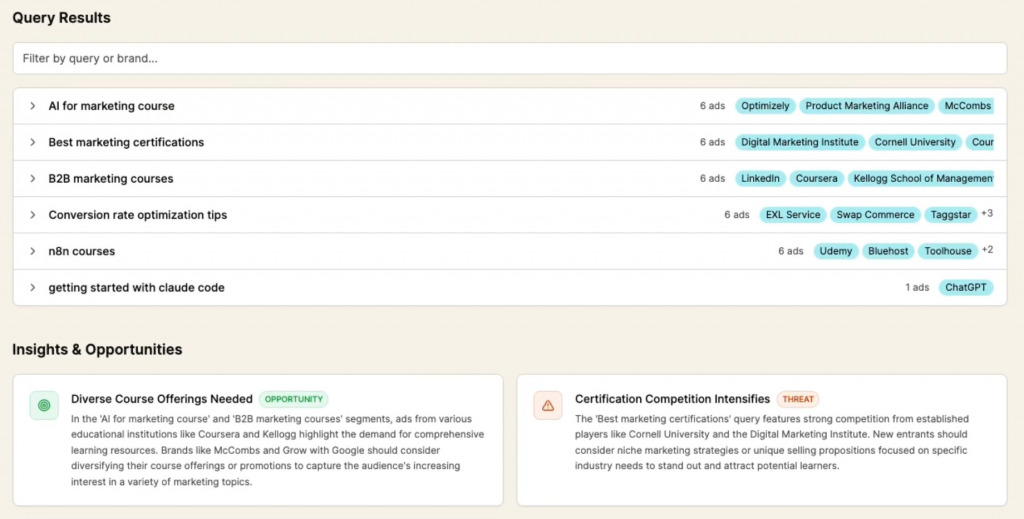
The first output ran immediately with no tweaks needed.
Don’t stop at generic keywords—track who’s bidding on your brand
Most teams analyze category keywords, competitor conquesting, and messaging angles, which are all useful. But there’s a more immediate blind spot most teams don’t have visibility into: competitors bidding on your branded keywords.
Conquesting campaigns have been standard practice for years. But knowing it in the abstract and having a live dashboard showing you exactly which competitors are bidding on your brand name, product names, and misspellings—that’s a different kind of awareness entirely.
The fix is a simple extension of the same workflow. Instead of uploading generic category queries, you upload a CSV of your branded terms.
Same stack. Same logic. But the output tells you something different:
- Which branded keywords are “safe” (no competitors bidding)
- Which ones are actively being targeted
- How competitors are positioning themselves in their copy when they appear against your brand
- A leaderboard of which competitors are showing up most frequently across your brand terms
That last point is surprisingly useful.
It’s not always the obvious competitors. Sometimes it’s a new entrant you haven’t been tracking. Sometimes it’s a reseller. Occasionally, it’s a direct comparison site you didn’t know existed. The leaderboard surfaces frequency, not just presence.
Nick Christensen surfaced this use case after seeing the generic keyword version—the observation that branded monitoring was a natural extension of the same architecture.
The implementation was straightforward because the underlying logic is identical. Different input data, same workflow, meaningfully different strategic output.
What the AI layer actually does (and where it earns its keep)
The AI layer in this workflow does three concrete things:
- Brand name normalization.
SERP data returns domain URLs, not clean brand names. go.salesforce.com and salesforce.com/crm are the same advertiser, but raw data won’t tell you that. The AI layer does the lookup and cleanup, so your advertiser list is accurate, rather than inflated with URL variants.
- Messaging pattern synthesis.
Across 40 queries and 300 ad impressions, the AI surfaces the dominant messaging angles: what emotional triggers competitors are using, which proof points keep appearing, where there’s messaging convergence (everyone’s saying the same thing—which is a gap opportunity), and where there’s divergence. You’d eventually see this manually, but AI sees it in seconds.
- Competitive opportunity flagging.
The final output includes a summary of whitespace, including messaging angles that aren’t being used, intent signals that aren’t being addressed, and queries where the competitive density is low enough to enter profitably. This is the output our performance marketing manager was using before deciding which keywords to pursue.
This is pattern recognition at a scale that humans simply can’t replicate efficiently.
Potential stumbling blocks in competitive ad monitoring
A few things can break this workflow or, worse, give you false confidence:
SERP personalization and geo-variance
Google serves different ads in different locations, to different users, at different times. The data you pull through SearchAPI is a snapshot, not a universal truth.
The fix: Run queries from multiple locations if you’re a multi-market business. Don’t assume one pull tells the whole story.
Coverage gaps in branded monitoring
Competitors don’t always bid on your exact brand name. They bid on misspellings, product names, executive names, event names, and campaign-specific terms.
The fix: Your branded keyword CSV needs to be comprehensive, or the leaderboard will undercount. Audit your list quarterly.
Treating competitive messaging as permission
If every competitor is saying “easy to use,” that doesn’t mean you should. It might mean the category is oversaturated with that angle and not saying it is the differentiation.
The fix: The AI will surface patterns—interpreting what to do with them is still your job.
Over-rotating on competitive response.
This tool is for positioning intelligence, not real-time bidding reaction.
The fix: Don’t rebuild your entire campaign structure every time a competitor shows up on a new query. Use the data quarterly for strategic input, rather than daily for tactical twitching.
Getting started: How to operationalize keyword and brand monitoring in your workflow
- Build the generic keyword version first. Create your competitor ad intelligence tool using Lovable and upload 10 keywords from a current or upcoming campaign. See who’s showing up and what they’re saying. This takes under an hour to set up, and the first output will almost certainly surface something you didn’t know.
- Add branded keyword monitoring as a second pass. Pull your top 20-30 branded terms: brand name variants, product names, and campaign names. Run them through the same workflow and check the leaderboard. You may find a competitor you weren’t watching.
- Run this before every new campaign, not after. The highest-value moment for this data is before you’ve committed budget to a keyword set. Build it into your campaign planning checklist.
- Export and store your results over time. The CSV export isn’t just for sharing; it’s for trending. Run the same keyword set quarterly and compare. Watch which competitors enter and exit and track messaging shifts. This is where the workflow turns from a tool into a system.
- Don’t mistake coverage for insight. The tool surfaces data. The insight comes from asking the right questions: Where is there genuine messaging whitespace? Which keywords have competitive density that doesn’t match conversion potential? Where is the intent strong enough to justify the fight?
Make competitive intelligence part of your campaign infrastructure.
Treating competitor ad intelligence as a one-time audit always leaves teams back where they started: running campaigns based on intuition, discovering competitors in their analytics instead of before launch, and reacting instead of positioning.
When you build the workflow and run it consistently, you have a structural advantage. Not because you have better instincts, but because you have better information, faster, at a fraction of the manual cost.
The stack is available. All that’s left is the discipline to build the system and actually use it.
For a competitive edge in search ad performance optimization, you need more than manual research skills—you need systems thinking.
CXL’s Paid Media, B2B Marketing and AI, and AI Agents for B2B Marketing programs help you bridge that gap, showing you how to turn scattered SERP observations into structured, automated intelligence loops that can run continuously, not just during audits.
From there, you can move directly into implementation through hands-on sessions focused on building real workflows:
- Measuring the modern AI-powered funnel
- Build content automations for lead generation with n8n
- B2B buyer pain-led GTM strategy
- B2B ad campaigns with Claude Code and n8n
- Optimizing B2B content funnels with AI
- Improve Meta ad performance with AI
- SEO automation with n8n and Claude Code
- Improve your LTV:CAC on Google Ads
- Build apps as content with AI
- Improve ad efficiency with LinkedIn thought leader ads
→ Join our upcoming Claude Code webinar focused on using Claude Code to move from manual marketing workflows to fully systemized, automated execution.
