Static data visualization is a silent engagement, productivity, and conversion killer. Marketers have been uploading data to tools like Flourish, Datawrapper, and Tableau for years—then manually formatting, exporting, and embedding the results.
It works, but it’s also slow and what took weeks to create is often lost and forgotten in a four-second scroll.
Anthropic introduced interactive charts and visualizations inside Claude conversations in March 2026. These make exploring data easier, while getting a chart onto your website requires a separate artifact and publishing workflow. We were skeptical. Plenty of tools already do this, and most are clunky enough that teams abandon them after one sprint.
But after running it against a real dataset, the skepticism faded fast.
TL;DR
- Claude can generate interactive charts from CSV data. Upload a dataset, ask Claude to visualize it, and refine the charts through follow-up prompts.
- CXL tested the workflow on 1,000 LinkedIn job-description records. Claude generated charts covering applicants, industries, and seniority, then narrowed the analysis to AI-related roles after a second prompt.
- To embed a Claude chart in a blog post, create a shareable, embeddable artifact, get its embed code, and test it in your CMS before publishing.
- AI-generated charts still need validation. Check the source data, calculations, labels, and mobile rendering. A convincing visualization isn’t proof that the analysis is correct.
Table of contents
- When should you use interactive charts instead of static tables?
- How does Claude turn CSV data into interactive charts?
- How do you create and refine interactive charts with Claude?
- How is Claude different from traditional data visualization tools?
- What this doesn’t solve
- How do you add interactive charts to an existing content strategy?
- Interactive data is effective, but it’s not a content strategy
When should you use interactive charts instead of static tables?
Interactive charts are useful when readers need to filter, compare, or explore different parts of a dataset. Static tables still work better for looking up exact values. The question isn’t whether you can make the chart interactive. It’s whether interactivity helps the reader understand the data.
When a reader hits a wall of numbers, they face a cognitive tax. They have to interpret the data themselves, hold multiple values in working memory, and construct their own insight.
Most don’t bother. They scroll past, or worse, they leave. Which means you’ve done all the analytical work and captured none of the engagement value.
Interactive charts flip this.
The reader becomes a participant. They filter, hover, zoom, and compare. The insight lands because they found it themselves, not because you told them what to think.
Static tables communicate “we have data.” Interactive charts communicate “we understand it.”
The difference in engagement isn’t subtle: it’s the difference between a reader skimming and a reader exploring.
So, if your content team is sitting on research, surveys, or any kind of structured dataset and publishing it as static HTML tables, you’re basically leaving credibility, and SEO dwell time, on the table.
How does Claude turn CSV data into interactive charts?
Claude can analyze an uploaded CSV file, generate interactive charts, and adjust those visuals through follow-up prompts. CXL tested this using 1,000 LinkedIn job-description records, generating an initial set of charts before narrowing the analysis to AI-related roles.
It’s available across all Claude plans and simple to use. You upload a CSV, ask for charts, and it generates interactive visuals. You can also refine them in the same conversation without starting over. That’s the whole pitch.
This is already becoming part of how marketers work. Venngage’s 2026 research found that 29% of surveyed marketers were using AI for data storytelling or visualization, while 55% were using it to generate visuals such as charts, infographics, and templates. The interest is there. Claude just makes the process a lot more accessible.
But what makes it really worth your while isn’t the feature itself, it’s the accuracy.
How do you create and refine interactive charts with Claude?
Upload your dataset, ask Claude to generate interactive charts, and use follow-up prompts to focus the analysis. You don’t need an elaborate prompt to get started. But you do need to check whether the charts reflect the data and the story you’re actually trying to tell.
We uploaded a 1,000-row dataset from a LinkedIn job description analysis we’d already done manually. The prompt was deliberately minimal:
| “Map out interactive charts based on the attached dataset.” |
No structure, no prompt engineering, and no field mapping instructions.
Two things stood out with the first output.
First, it analyzed the dataset accurately, which sounds like a low bar until you’ve watched other LLMs hallucinate column values or conflate fields.
Second, it read the context. The charts it generated mirrored how we’d originally framed the analysis in our blog: focused on applicants, industries, and seniority distribution. It didn’t just process the CSV; it inferred intent.
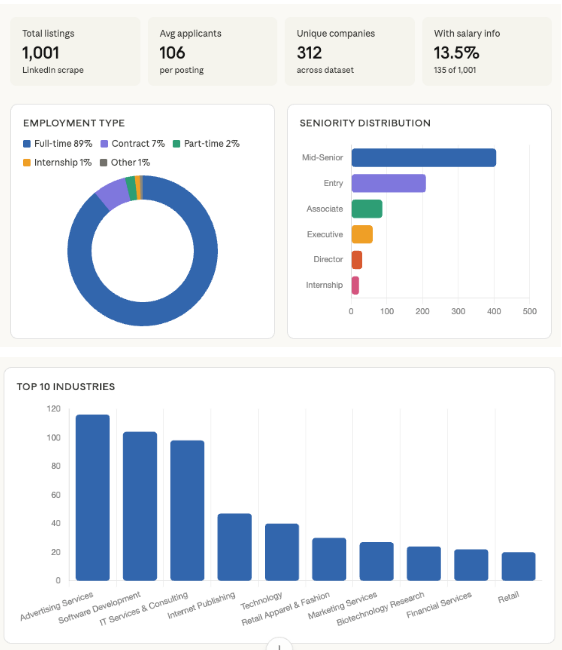
But, the initial output wasn’t perfect—it stayed broad when we needed specific.
So we followed up, asking it to zero in on how AI appears in those job descriptions. Same quality output, just with a tighter focus.
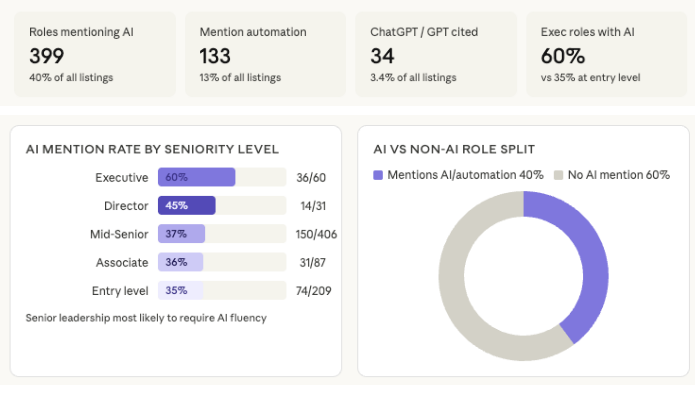
Again, the prompt was simple. No real structure, no prompt engineering best practices, and still, Claude got it right.
That’s the workflow we tested: one rough prompt to see what it builds, one refined prompt to get what you need. But creating the chart and publishing it are two different steps. If you want the visualization in your blog, you’ll need a version that can be published and embedded.
How is Claude different from traditional data visualization tools?
Claude reduces the work between uploading a dataset and producing a usable visualization. Instead of building and adjusting every chart manually in a separate tool, you can refine the analysis through conversation. Publishing still requires a compatible artifact and an embed that works in your CMS.
There are already plenty of AI data visualization tools. Flourish is excellent, and Datawrapper is pretty fast. So why does this matter?
Because the bottleneck was never the charting tool; it was the handoff: the step between “we have a dataset” and “this is live in the article.”
The old workflow looked like this:
| analyst creates data → designer builds chart in Flourish or Datawrapper → developer embeds it → content team gets it three days later. |
Most lean content teams don’t have the capacity for this workflow, or they’re already stretched thin.
Claude collapses that handoff.
The new workflow:
| Upload CSV → iterate in Claude → create an embeddable artifact → publish it → test it in your CMS. |
It’s still a workflow one person can handle, without a designer-developer handoff for every chart.
But don’t confuse fewer steps with no steps. Your data still needs cleaning, the chart still needs checking, and your CMS still needs to support the embed. Claude removes a lot of the production friction. It doesn’t remove the responsibility for what you publish.
There’s no new tool to learn, no account to create, and no CSV formatting requirements to meet first. You ask, it delivers, you refine. Simple as that—your static blog post becomes an interactive data experience without touching your CMS configuration or calling a developer.
That’s more than a minor UX improvement. That’s removing an entire class of friction from data-driven content production.
You don’t need to overdo it either. Embedding two or three key interactive charts in a data-heavy post is enough to meaningfully change the reader experience.
How do you embed Claude-generated charts in a blog post?
To embed an interactive Claude chart on your website, you need a publishable artifact, not just a visualization generated inside a conversation.
Claude’s inline visuals are temporary. They can change or disappear as the conversation develops. Artifacts are designed for work you want to keep and share.
Here’s the publishing workflow:
- Create an artifact. Ask Claude to turn your validated chart into a reusable artifact. Check that the data and calculations still match the original.
- Publish it. If your artifact has the Publish option, use it to make the artifact available.
- Get the embed code. For supported published chat artifacts, select “Get embed code” and add your website to the allowed domains.
- Test it in your CMS. Paste the embed into your article and check how it behaves on desktop and mobile. Make sure the labels, controls, and data remain readable.
The publishing options differ between Claude plans and artifact types, so check what’s available in your account before building your content workflow around it.
And don’t make the interactive chart the only place readers can access the findings. Give them the key numbers and conclusions in the surrounding article, too.
Generating the visualization is the easy part. Making it reliable and useful on your website is the part worth checking.
What this doesn’t solve
This isn’t perfect, and you should know where it breaks down.
- Complex or dirty datasets will trip it up. If your CSV has merged headers, inconsistent formatting, or calculated fields that aren’t labeled clearly, Claude will make assumptions, and those assumptions won’t always be right. Clean your data before you upload it.
- The first output usually isn’t the final output. Claude will pick the chart types it thinks are appropriate, which means your first pass might lead with bar charts when you needed a scatter plot, or aggregate data that you needed broken out. Budget time for refinement. The iteration loop is fast, but it’s not zero.
- Embed codes need testing. The visuals look good inside Claude’s interface. They don’t always render identically across every CMS. WordPress, Webflow, and HubSpot all handle embeds differently. Test in staging before you publish.
A sharper presentation layer won’t rescue weak analysis. If your underlying data has sampling problems, selection bias, or just isn’t interesting, Claude will simply make your mediocre insights look better.
That’s not a win, and neither is using it as a shortcut for actual research.
The standard for data-driven content is on the up because the production barrier has come down. Use the feature to present strong analysis more effectively, not to fake it.
How do you add interactive charts to an existing content strategy?
Start with data-backed articles that already attract relevant readers. Use their source datasets to create charts that reveal something useful, check the numbers, and test the embeds before updating the live posts.
- Pull your highest-performing data posts: Look for research-backed content with strong organic visibility and datasets that could support meaningful comparisons or exploration. These are the highest-leverage candidates for a visualization upgrade.
- Upload the underlying dataset to Claude: Keep your first prompt minimal. Ask for interactive charts based on the dataset. Let it interpret before you redirect.
- Follow up with your actual editorial angle: Your second prompt should be specific. Ask it to focus on the dimension of the data that matches your story. This is where Claude earns its keep. It doesn’t just visualize; it reframes the data around a narrative.
- Export the embed code and test it in your staging environment: Before you update a live post, confirm the chart renders correctly in your CMS. Check on mobile. Resize the viewport. Don’t skip this step.
- Update the surrounding content, not just the chart: Make sure the article explains the key findings in text, and update the meta description and internal links where relevant. Don’t rely on an embed alone to communicate the research.
Frequently asked questions
Can Claude create interactive charts from CSV data?
Yes. Upload a CSV file, ask Claude to visualize the data, and refine the charts through follow-up prompts. You can request specific comparisons, filters, or chart types without building each visualization manually.
Can you embed Claude charts in WordPress?
Yes, if you have a supported, embeddable Claude artifact and your WordPress setup permits the embed code. Published legacy chat artifacts can provide embed codes with allowed-domain settings. Test the result before publishing.
How accurate are Claude-generated charts?
Claude can generate useful charts, but accuracy isn’t guaranteed. It can misinterpret columns, aggregate values incorrectly, or choose misleading visual scales. Check the numbers, labels, and calculations against the original dataset.
What’s the difference between Claude’s interactive charts and artifacts?
Inline charts are temporary visualizations created during a Claude conversation. Artifacts are reusable outputs intended for work you want to keep or share. Publishing a chart on a website generally requires an appropriate artifact.
Do interactive charts improve SEO?
Not automatically. Interactive charts can help readers explore original research, but they don’t guarantee better rankings. Keep the important findings accessible in text, provide meaningful context, and make sure the embed works across devices.
Interactive data is effective, but it’s not a content strategy
Interactive charts won’t fix weak analysis. A visually dynamic presentation of shallow research is still shallow research.
The data backs that up. In Content Marketing Institute’s 2026 B2B research, 74% of marketers who reported improved content strategy effectiveness credited refining their strategy, compared with 51% who credited implementing new technology. Better tools help. But they don’t replace knowing what you’re trying to communicate.
The real unlock here isn’t the chart itself. It’s what happens when your content team can close the loop between analysis and presentation without a four-person handoff chain.
The practitioners who will get the most out of this are the ones who already have proprietary data—customer survey results, industry benchmarks, internal sales data—and have been under-presenting it.
If your dataset is strong and your static tables have been burying it, Claude’s visualization feature is a legitimate production accelerator. However, if you’re looking for a way to make thin content look more authoritative, this isn’t it.
The real opportunity? Turning raw data into interactive content that drives decisions.
CXL’s B2B Marketing and AI and Digital psychology and persuasion Minidegrees, and Data Visualization & Presentation Course will give you the foundation you need to create scroll-stopping visuals.
Join CXL’s AI Native Marketing program
Creating a chart is one workflow. Building a marketing system that uses your data to make better decisions is another.
CXL’s AI Native Marketing program takes that further. You’ll build a shared marketing brain, a campaign engine with quality checks, and a reporting agent that turns performance data into useful updates. The goal isn’t to add another AI tool. It’s to build systems that actually do the work.
