Tracking AI visibility used to be largely a black box.
Third-party tools like Semrush and Ahrefs gave marketers ways to estimate where their content appeared in AI-generated answers. But first-party reporting was limited. You could monitor citations, but you couldn’t easily verify them against data from the search platforms themselves.
That changed in February 2026, when Microsoft introduced AI Performance in Bing Webmaster Tools.
For the first time, publishers could see which pages Microsoft Copilot, Bing’s AI answers, and select partner integrations were citing, along with the grounding queries associated with those citations.
Microsoft has since expanded the report with query intent, topic-level visibility, citation share, and new ways to identify content opportunities.
Naturally, there’s a lot of hype online. So, we tested it ourselves.
Here’s what it actually shows, what you can do with it today, and where it still falls short.
TL;DR
- Google now has separate AI search reporting, too. Search Console shows impressions from AI Overviews and AI Mode. Use it alongside Bing’s citation data, rather than treating long-tail organic searches as a proxy for AI citations.
- Bing Webmaster Tools tracks AI citations across Microsoft Copilot, Bing’s AI answers, and select partner integrations. It shows cited URLs, grounding queries, and citation trends, but doesn’t directly attribute clicks or conversions.
- Bing’s AI Performance report now includes Intents, Topics, Citation Share, and Compare. These show why content is being surfaced, which topics it covers, its share of citations for a query, and how visibility changes over time.
- Topics Portfolio identifies AI search content opportunities. Microsoft’s October 2026 beta shows thematic visibility, topic demand, competing source counts, and queries where other sites are cited but yours isn’t.
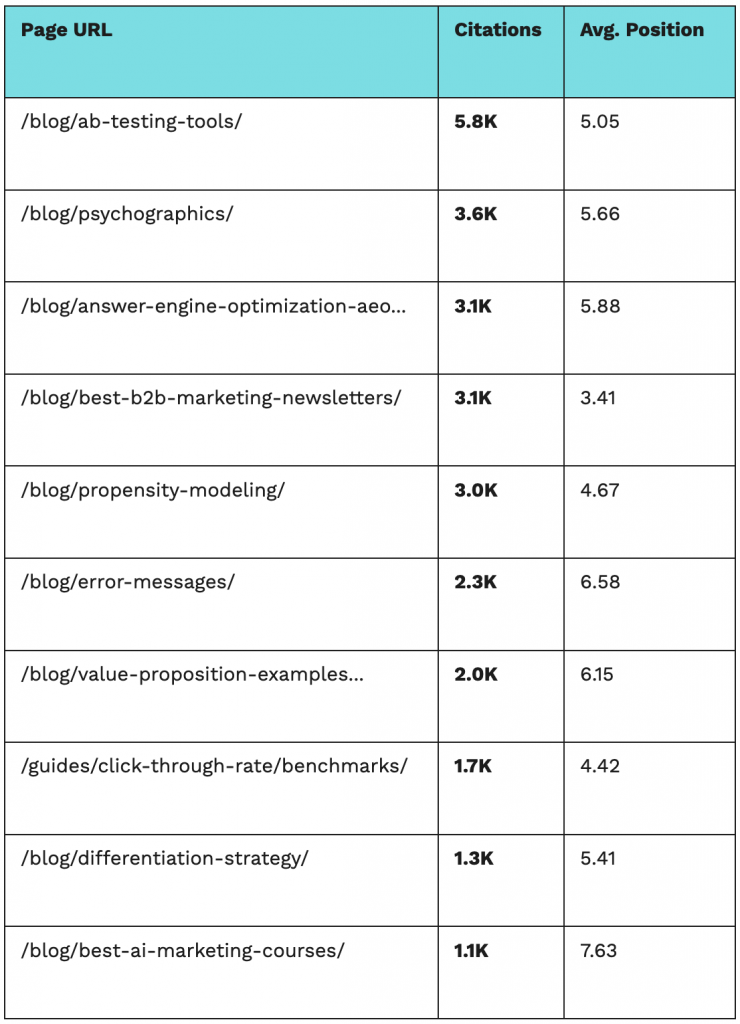
- CXL’s initial test found overlap between AI citations and organic performance. Its ten most-cited pages averaged approximately position five in organic search, although that small sample doesn’t establish a general ranking relationship.
Table of contents
- What does Bing Webmaster Tools AI Performance measure?
- What does CXL’s Bing data reveal about SEO rankings and AI citations?
- Can Bing AI citation data tell you how visible you are in ChatGPT and Google?
- How do you track AI visibility in Google Search Console?
- How do you use Bing AI Performance data to improve your content?
- Close the loop on AI discovery
What does Bing Webmaster Tools AI Performance measure?
Bing Webmaster Tools AI Performance measures how often a website’s pages are cited in supported AI-generated answers, which URLs are referenced, and the grounding queries associated with those citations. It also shows citation trends, topic-level visibility, and the site’s share of citations for individual grounding queries.
The report is built around citations when Bing’s AI retrieves and references your content to generate an answer.
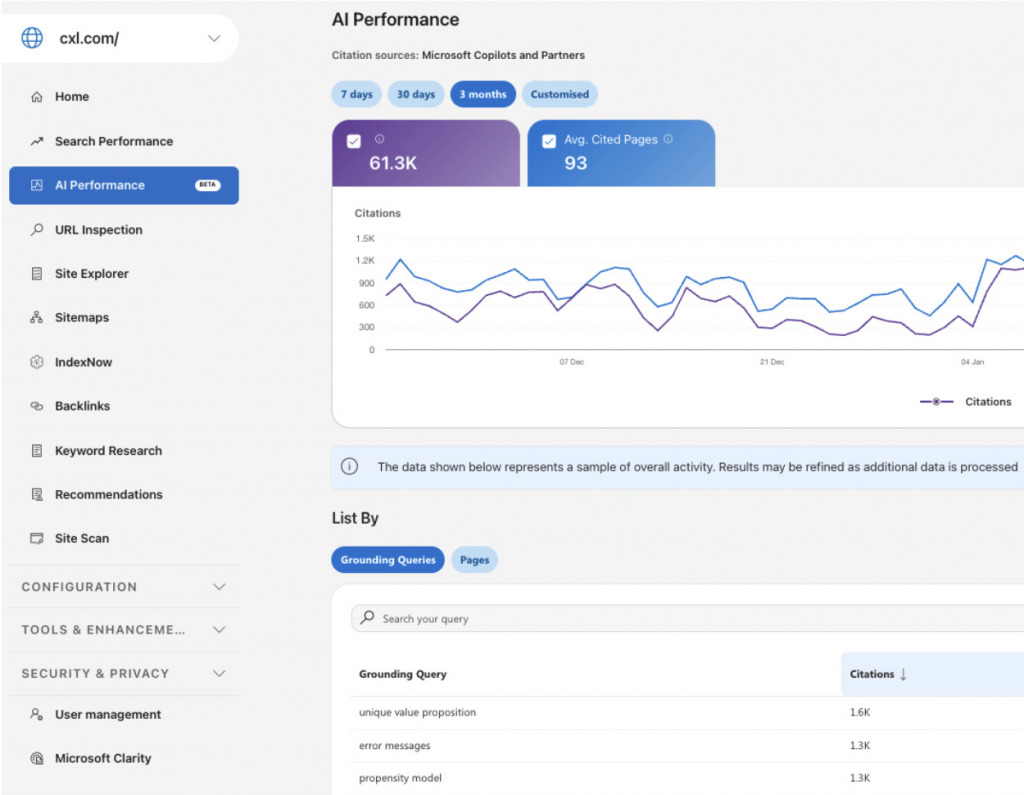
The original dashboard provides five core measurements:
- Total Citations: How many times your content appeared as a cited source in supported AI-generated answers during the selected period.
- Average Cited Pages: The average number of unique pages from your site cited per day.
- Cited Pages: Which individual URLs received citations, and how frequently.
- Grounding Queries: The phrases Bing’s AI systems used when retrieving content. These are sampled retrieval queries, not necessarily the exact questions users typed.
- Visibility Trends: How citation activity changes over time.
One important distinction: a citation isn’t an impression, and neither is automatically a click. Bing counts visible source references in AI answers, not the number of people who subsequently visited your website.
That’s a legitimate and meaningful dataset.
Knowing which pages Bing’s AI experiences are citing, and which grounding queries are associated with those citations, gives content teams information they didn’t previously have.
But here’s the gap that makes the whole report incomplete: there’s no click data.
You can see that you’re being cited. You can’t see whether anyone actually visited your site as a result. That’s not a minor omission. It’s the difference between measuring visibility and measuring impact. Which cited pages are actually driving traffic? Which topics make users curious enough to click through?
Without that layer, you’re essentially optimizing for citations you can’t prove are doing anything.
Microsoft has expanded the report considerably since its launch. But the missing piece is still attribution. Citation data can tell you where your content appears in AI answers. It can’t directly tell you how many people clicked, what those visitors did, or whether the citation contributed to revenue.
What do Intents, Topics, Citation Share, and Compare show?
Bing’s AI Performance report now goes beyond counting citations. In June 2026, Microsoft introduced four features designed to help publishers understand the context behind their AI visibility.
Here’s what each one adds:
- Intents: Groups grounding queries into categories such as informational, commercial, navigational, research, creation, and local. You can see the kinds of tasks where AI is using your content.
- Topics: Groups related grounding queries into broader themes. Instead of looking at individual phrases, you can see which subject areas are generating citations.
- Citation Share: Shows the percentage of citations attributed to your site out of all citations shown for a specific grounding query. This helps you identify where your content has a stronger or weaker presence.
- Compare: Lets you compare citation activity between two periods, making it easier to spot increases, declines, and changes following content updates.
These are useful additions, particularly for content teams trying to understand which topics are earning visibility.
But don’t confuse Citation Share with market share or traffic share. Microsoft explicitly describes it as an observational metric, not a ranking system or competitive leaderboard.
The new features provide more context around citations. They still don’t tell you whether someone clicked through.
How does Bing’s Topics Portfolio identify AI search opportunities?
Topics Portfolio shows where your website is already appearing in AI-generated answers and where other sites are getting cited instead.
Microsoft introduced the feature in October 2026 as a beta inside Bing Webmaster Tools’ AI Performance report.
Rather than examining individual grounding queries, you can now look at a broader topic and see:
- Topic Size: The approximate number of citations across all sites for that topic during the selected period.
- Sites Cited: The approximate number of different websites being cited within that topic.
- Queries: The approximate number of distinct grounding queries associated with the topic.
- Your Grounding Queries: Queries where your website already appears.
- Opportunity Queries: Queries where other websites are cited but yours isn’t.
That last one is useful.
Instead of guessing which AI search topics deserve attention, you can start with queries where Bing is already retrieving and citing other sources.
To use it, open Bing Webmaster Tools > AI Performance > Topics Portfolio (or the Topics tab, depending on the interface). Select a topic, review the queries where you’re already getting citations, and compare them with the opportunity queries.
Then look at the content behind those gaps. Are competitors answering something your page misses? Do you have the right content, but with outdated information? Or is there a topic you haven’t covered at all?
Don’t treat every opportunity query as a content brief. Microsoft says the beta uses AI-generated classifications and approximate ecosystem data. Some suggested opportunities won’t be relevant to your business.
It’s still a meaningful step forward. The original report told you where your content was showing up. Topics Portfolio helps you investigate where it isn’t.
What does CXL’s Bing data reveal about SEO rankings and AI citations?
In CXL’s initial test, the ten pages most frequently cited by Bing’s AI report also performed well in traditional organic search, averaging approximately position five. That suggests overlap between organic performance and AI citations within this sample, but it doesn’t establish that higher rankings cause more citations.
Here’s the most useful signal from our own dashboard, and it cuts against a lot of the noise around generative engine optimization: our top 10 most-cited pages also rank, on average, around position five in organic search.
That’s worth paying attention to.
The pages showing up most often in our Bing AI report weren’t obscure pieces of content. They were already doing well in traditional search.
But this is a sample of ten pages from our own website. It shows a relationship worth investigating, not a universal rule about how AI systems select sources.
The broader data is more complicated. In Ahrefs’ March 2026 analysis of four million Google AI Overview citation URLs, only 37.1% also ranked in the organic top ten for the same query.
That’s a different AI search system, so the figures aren’t directly comparable. But it reinforces the point that organic rankings and AI citations aren’t interchangeable.
Strong SEO still matters. Making content accessible, relevant, useful, and trustworthy gives AI search systems a better foundation to work from.
What we shouldn’t assume is that good rankings guarantee citations, or that a few cited pages prove GEO needs no additional analysis.
The overlap is real in our sample. The explanation still needs testing.
We’ve also looked at where Google AI Overviews pull their citations from. That analysis examines which parts of a page Google references, rather than assuming the highest-ranking result automatically becomes the source.
Can Bing AI citation data tell you how visible you are in ChatGPT and Google?
Bing Webmaster Tools reports on supported Microsoft AI experiences and select integrations. It doesn’t measure citations across every AI platform. To understand wider visibility, marketers need to compare the Bing data with Google’s reports and observations from other AI systems.
It’s also important to keep the context in mind: Bing represents a relatively small share of overall search usage compared to Google. What gets cited in Bing’s AI answers or Microsoft Copilot doesn’t automatically reflect what’s happening in Google’s AI Overviews, ChatGPT, or other LLM platforms.
So the data is real, but it’s not representative, which means you’re only looking at one slice of AI visibility, not the full picture.
For now, the most effective way to use it to track AI visibility is:
- Export Bing’s grounding queries. These are phrases the AI systems used to retrieve information that was subsequently cited. They provide useful evidence of retrieval activity, but they aren’t necessarily the exact prompts users submitted.

- Run those queries manually in Google, ChatGPT, and other platforms. See if your content gets cited. If your content isn’t cited, note which sources appear instead and compare the information they provide. That can reveal content gaps, although it won’t prove why an AI system selected one source over another.
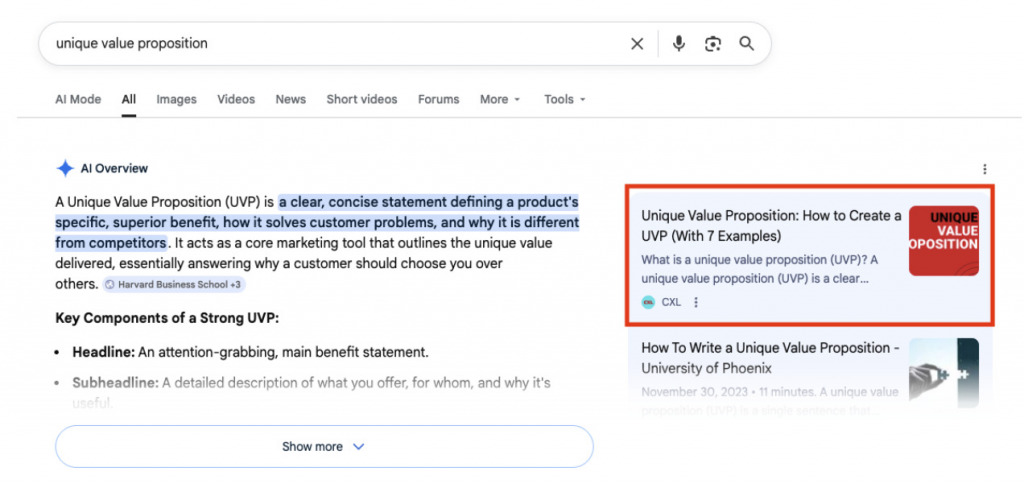
This won’t be as precise as getting first-party data from each platform directly. Results vary by user and context, and you’re doing comparative analysis rather than working with clean metrics. But you’re starting from real queries connected to real AI retrieval events, which is a significantly better starting point than guessing.
The grounding queries alone justify setting up the report. Everything else is a bonus.
How do you track AI visibility in Google Search Console?
Google has now followed Microsoft into first-party AI search reporting.
In June 2026, Google introduced dedicated Generative AI performance reports in Search Console, with worldwide availability completed by the end of August.
The report covers impressions from AI Overviews and AI Mode. You can identify which pages appeared in those features, see how impressions change over time, and break the data down by country, device, and date.
It’s not the same dataset as Bing’s.
Google reports impressions when links to your site are displayed in its generative AI search features. Bing reports citations across its supported AI experiences, including the grounding queries associated with those citations.
Neither report gives you complete visibility into the full buying journey.
But together, they provide a more useful starting point than guessing which pages AI systems might be using.
How do you find AI Overview and AI Mode impressions in Search Console?
Open your verified Google Search Console property and select the Generative AI performance report under Search.
From there:
- Choose the date range you want to analyze.
- Review total impressions from Google’s supported generative AI features.
- Switch to Pages to identify the URLs receiving impressions.
- Use the country, device, and date breakdowns to investigate changes.
- Export the report if you want to compare it with your Bing data or internal reporting.
If you don’t see the report, Google says your site may not have received enough qualifying impressions.
One limitation worth noting: Google’s dedicated AI report doesn’t expose the grounding queries or citation-share metrics Bing provides. And the impression count shouldn’t be treated as a conversion or traffic metric.
It tells you your link was shown. Not what happened afterward.
Can long-tail queries still help with AI search research?
Yes, but long-tail queries are a content research technique, not evidence that a page has been cited by an AI system.
In Search Console, you can still use a regular expression to identify longer, more specific search queries:
- Open Performance > Search results > Queries.
- Select Add filter > Query > Custom (regex).
- Enter this expression to identify queries containing seven or more whitespace-separated words:
^(\S+\s+){6,}\S+$
This surfaces longer searches that may be useful when investigating specific customer questions or content gaps.
But query length doesn’t tell you whether Google generated an AI Overview, retrieved your content through an AI system, or cited your page.
Use Google’s dedicated report for AI impressions. Use the regex filter for additional search-intent research.
Different questions. Different datasets.
Once you’ve identified priority pages, our AI Overview gap analysis shows how to compare the information in your content with what’s appearing in Google’s AI-generated answers.
How do you use Bing AI Performance data to improve your content?
Use Bing’s citation data to identify your strongest pages, the topics where you’re gaining visibility, and the queries where other websites are getting cited instead. Then compare those findings with Google AI search impressions, organic performance, and business results before deciding which content to update.
- Set up Bing Webmaster Tools. Verify your website and open the AI Performance report. Start by reviewing citations and cited pages. This gives you a baseline of where your content is appearing across supported Microsoft AI experiences.
- Export your grounding queries and cited pages. Identify which URLs get cited most frequently and the retrieval phrases associated with them. Keep the source, date range, and citation count attached to the data.
- Review Intents, Topics, and Citation Share. Look at the themes where you’re receiving citations, the kinds of queries involved, and how much of the citation space your site receives for relevant grounding queries. Use Compare to check whether those patterns are changing.
- Explore Topics Portfolio. Where the beta is available, examine the opportunity queries for your priority topics. Identify questions other sites are being cited for and investigate whether you have a relevant page, a content gap, or outdated information.
- Compare the findings with Google and other AI platforms. Use Search Console’s Generative AI performance report to review which pages receive impressions in Google’s AI features. Run important grounding queries manually in ChatGPT or other platforms to understand which sources appear. Don’t expect identical results across systems.
- Prioritize updates and measure what changes. Improve pages where the evidence points to missing information, weak explanations, outdated research, or genuine topical gaps. Monitor citation trends and AI impressions, then use your analytics and CRM data to evaluate referral traffic and business outcomes where attribution is possible.
Frequently asked questions
What does Bing Webmaster Tools AI Performance track?
It tracks citations of your website in supported Microsoft AI experiences, including Copilot and Bing AI answers. You can see cited pages, sampled grounding queries, citation trends, and additional topic and intent data.
Does Bing Webmaster Tools show AI referral traffic?
No. AI Performance measures citations, not clicks or conversions caused by those citations. Use website analytics to investigate identifiable AI referrals, but don’t treat them as a complete measure of AI-generated demand.
What is Citation Share in Bing AI Performance?
Citation Share is the percentage of citations attributed to your site out of all citations shown for a specific grounding query. It’s a measure of relative citation presence, not organic ranking, traffic share, or conversion performance.
What is Bing’s Topics Portfolio?
Topics Portfolio is a 2026 beta that groups AI grounding queries into themes and highlights queries where other websites are cited but yours isn’t. It helps identify content opportunities using approximate citation and topic data.
Can Google Search Console track AI Overviews?
Yes. Google’s Generative AI performance report shows impressions from AI Overviews and AI Mode, including page, country, device, and date breakdowns. It doesn’t provide the same grounding-query and Citation Share data as Bing.
Close the loop on AI discovery
AI visibility is becoming much easier to measure. That’s real progress.
Bing now shows citations, grounding queries, intent categories, topic-level visibility, and opportunities where other sites appear but yours doesn’t. Google provides a separate view of impressions from AI Overviews and AI Mode.
Neither gives you the whole picture.
A citation doesn’t prove someone clicked. An AI impression doesn’t tell you whether the reader became a customer. And a spike in visibility doesn’t automatically mean an optimization worked.
But at least we’re no longer operating entirely on estimates and third-party tracking.
The useful move now is to combine the data: understand where your content gets surfaced, look for the gaps, make improvements backed by evidence, and measure what happens afterward.
That’s a better use of AI visibility reporting than chasing citation counts for their own sake.
For the commercial side of that measurement problem, we’ve also looked at LLM traffic versus Google traffic and why the value of a visit matters more than citation counts alone.
What to do next
Bing and Google now give marketers more visibility into how their content appears in AI search. The next step is knowing what to do with that information. CXL’s Optimize pages for AI search with GEO/AEO course covers auditing AI visibility, identifying content gaps, and building pages that answer the questions buyers ask during AI-powered research. For a broader content strategy, Content strategy for LLM visibility and changing search habits covers using proprietary research, customer insights, and off-site authority to improve discoverability across AI platforms.
Join CXL’s AI Native Marketing program
Tracking citations is one part of the job. Turning that data into a repeatable process for making better marketing decisions is another.
CXL’s AI Native Marketing program helps marketers build working AI systems around their own data. The current program covers a shared marketing brain, a campaign engine with quality checks, and a reporting agent that brings performance information together into useful updates.
The point isn’t another dashboard. It’s knowing what to do with the information.
