The biggest limitation of large language models today isn’t intelligence. It’s memory.
Open a new chat, switch to a different project, or kick off a new workflow, and you’re back to square one. You re-explain who you are, how you work, what your goals are, your tone of voice, your systems, your active projects, and the dozens of small details that actually make an AI’s output usable instead of generic.
Multiply that across every chat, every project, and every AI agent or automation you build, and the problem compounds fast.
Your AI is only as good as the context you give it. And right now, most people are re-typing that context from scratch, every single time.
That’s the gap a note-taking app is quietly stepping in to fill. Obsidian, once known mainly as a tool for personal knowledge management, is becoming something bigger: the context layer that AI workflows run on top of.
Here’s what Obsidian actually is, why it’s becoming the “memory layer” for AI, and how people are using it alongside Claude Code to build a working AI second brain.
TL;DR
- Obsidian works as an external memory layer for AI tools. It stores projects, research, preferences, and past decisions in linked, locally stored Markdown files.
- Obsidian and Claude Code work together: Obsidian holds the context; Claude Code reads it, uses it to complete tasks, and can write updates back to the vault.
- Obsidian helps solve the context problem in recurring AI workflows. Instead of re-explaining projects and decisions in every session, AI agents can retrieve the relevant information from a persistent knowledge base.
- Kieran Flanagan’s AI second brain uses three processes: loading context at session start, saving mid-session summaries, and recording decisions at session close so the next session can build on previous work.
Table of contents
What’s the biggest limitation in AI workflows?
The biggest limitation in recurring AI workflows is context continuity. Models can write, reason, and execute tasks, but without access to previous decisions, preferences, and project history, every new session risks starting from scratch.
Model capability has scaled fast. Reasoning, writing, coding, and analysis have all improved dramatically over the past two years.
But none of that matters if the model doesn’t know anything about you.
Every new conversation starts cold. No memory of your last project, your preferences, your past decisions, or the reasoning behind them. For casual one-off questions, that’s fine. For anyone trying to use AI as an actual working partner, across projects, over weeks and months, it’s a serious constraint.
This becomes even more visible as people move from using AI for single prompts to building agents, automations, and recurring workflows. An agent that has to be re-briefed every time it runs isn’t really automating anything. It’s just outsourcing typing.
That’s the problem people are trying to solve. And a plain-text note-taking app turns out to be a surprisingly good answer.
What Is Obsidian?
Obsidian is a note-taking app built on plain markdown files, stored locally on your computer rather than locked inside a proprietary database.
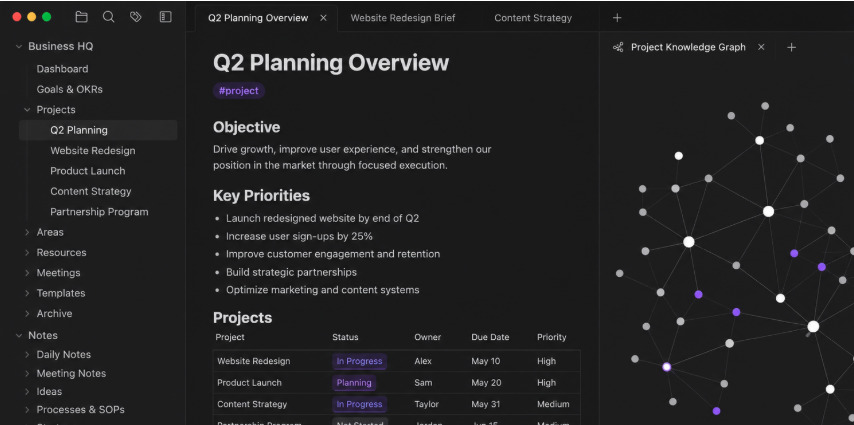
Everything you create lives inside what Obsidian calls a vault: a structured collection of notes, projects, meeting records, drafts, research, and resources that all connect to each other.
The core idea that separates Obsidian from a typical notes app is linking. Instead of writing isolated, disconnected notes, you connect them:
- A meeting note links to a project.
- A project links to a strategy document.
- A strategy document links to research, tasks, ideas, or even saved AI prompts.
Over time, these links accumulate into something closer to a map of how you think and work, not just a folder of files.
From notes app to knowledge system
What started as a personal note-taking tool has quietly evolved into something larger: a personal knowledge hub, often described as a “second brain,” and increasingly, the central context layer powering people’s AI workflows.
Instead of scattering ideas across random docs, chat histories, screenshots, bookmarks, and voice memos, people are consolidating everything into one structured system that an AI model can actually reference and understand:
- Your active projects
- Your writing style and tone
- Your business ideas and strategy
- Your meeting notes and decisions
- Your frameworks and processes
- Your content strategy
- Your overall way of thinking
All stored in one interconnected place, in plain text, that never gets locked behind a proprietary format.
Why does Obsidian work as an AI memory layer?
Obsidian gives AI tools access to persistent context through plain Markdown files, linked notes, and local storage. With the right file permissions, an AI agent can retrieve project information and previous decisions without relying on a single chat history.
A few structural properties make Obsidian particularly well-suited to sit underneath AI tools, rather than just being a place humans write notes:
- Plain markdown files: Because vault contents are just
.mdfiles on disk, AI tools and coding agents can read, search, and reference them directly, without an API, a plugin, or a proprietary export step. - Bi-directional linking: Notes that reference each other create an implicit knowledge graph. That structure helps an AI tool traverse from a task to the relevant strategy doc, past decision, or research note, the same way a person would.
- Local-first storage: Your vault lives on your machine, not inside someone else’s cloud product. That matters for sensitive business context: strategy docs, KPI reviews, and internal workflows you may not want sitting inside a third-party SaaS tool indefinitely.
Put together, this turns Obsidian into a database an AI system can query for context, instead of a notes app a human occasionally reopens.
How do Obsidian and Claude Code work together?
Obsidian acts as the knowledge base, while Claude Code reads, uses, and updates that knowledge to complete tasks. The combination lets AI workflows draw on existing project context rather than starting with a blank slate.
People are using Obsidian vaults as living context databases for AI-assisted coding, content systems, SEO workflows, startup planning, research, and even fully automated agents.
Instead of re-explaining your business or workflow to an LLM every time you open a chat, your AI references an evolving system that already contains the context it needs.
In many ways, Obsidian is becoming the memory layer, and Claude Code is becoming the interface that reads and writes to it.
Kieran Flanagan’s AI second brain
One of the clearest working examples comes from Kieran Flanagan, who built what he calls an “AI second brain” by combining an Obsidian vault with Claude Code.
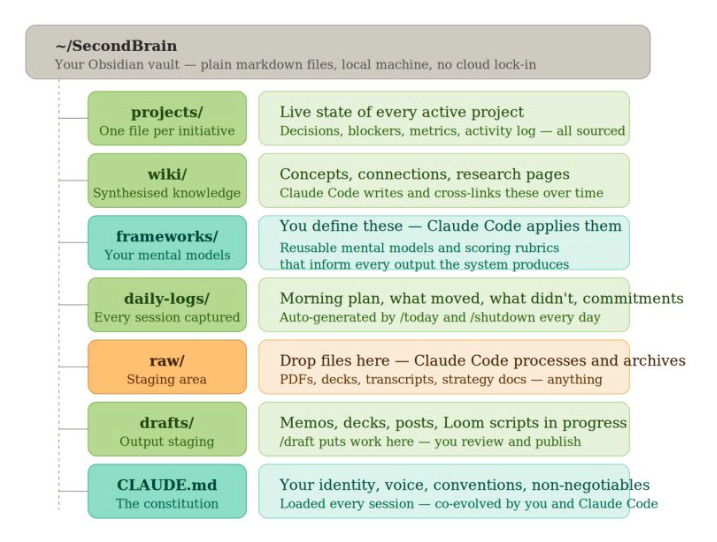
His vault holds strategy docs, meeting notes, research, KPI reviews, experiments, and internal workflows. Claude Code sits on top of it as the interface layer, reading from and writing to that vault as he works.
To make the system self-sustaining, Kieran built custom commands and reusable “skills” that automatically load the relevant context into Claude depending on the task at hand. If he’s reviewing KPIs, Claude pulls the KPI history. If he’s planning a campaign, Claude pulls the relevant strategy docs and past experiments. No manual copy-pasting required.
Three background processes that solve the memory problem
The core issue Kieran’s system solves is one every Claude Code (or any LLM) user eventually runs into: the model forgets everything the moment you close the session.
His setup runs three background processes to get around that:
- Session start: Loads full relevant context into Claude automatically when a new session begins.
- Mid-session save: Saves a summary of the session if memory usage runs low, so nothing important gets lost mid-task.
- Session close: Captures decisions and actions taken during the session and writes them back into the vault.
The result is a system where context compounds instead of resetting. Every session makes the next one smarter, because the vault, not the chat window, is where the real memory lives.
Obsidian handles knowledge. Claude Code handles execution.
LLMs are becoming excellent execution layers. They write, summarize, analyze, organize, and generate ideas remarkably well.
But execution quality still depends entirely on the context behind it. A model with no memory of your business, your goals, or your past decisions will always default to generic output, no matter how capable it is.
Obsidian is emerging as the layer that solves that problem: a structured, linkable, local-first knowledge base that AI tools can actually read and build on. Claude Code is emerging as the interface that puts that knowledge to work.
Together, they represent a genuinely different way of working with AI: not re-explaining your context every time, but building a system that remembers it for you.
Frequently asked questions
Can Obsidian be used as an AI memory system?
Yes. Obsidian stores project information, research, and decisions in Markdown files that AI agents can access. But persistent memory requires a workflow that retrieves relevant notes and saves new information between sessions.
How do you connect Obsidian to Claude Code?
Give Claude Code access to your local Obsidian vault. From there, you can configure instructions, commands, or skills to load relevant files, use them during tasks, and save decisions back to the vault.
Does Obsidian have built-in AI capabilities?
Obsidian isn’t a built-in AI agent. Its core function is organizing and connecting knowledge, although plugins and external tools can add AI capabilities. Claude Code can work directly with the vault’s Markdown files.
Is Obsidian better than chat memory for AI workflows?
For complex, recurring workflows, an Obsidian vault gives you more control over what information gets stored and reused. Chat memory can retain useful details, but a structured vault makes project documents, research, and previous decisions directly accessible to compatible tools.
Is Obsidian private when used with Claude Code?
Obsidian stores notes locally by default. But when Claude Code sends vault contents to a cloud-based AI model, that information may be processed externally. Local file storage doesn’t automatically mean private AI processing.
What to do next
If you want to build your own AI second brain, CXL’s Build your personal AI operating system course walks through setting up a project library, persistent Claude instructions, and reusable commands that load your context automatically. For marketers looking to apply the same approach to brand positioning, messaging, and campaign work, Marketing Brain: context engineering covers building a structured context library that AI tools can actually use.
Join CXL’s AI Native Marketing program
Marketing titles are becoming obsolete. What matters now is what you can actually ship.
CXL’s AI Native Marketing program helps marketers move beyond individual AI tasks and build working systems. The live sprint covers creating a marketing brain, a campaign engine with a quality gate, and an automated reporting agent. It’s about integrating AI into how you work, not just adding another tool to the stack.
