Free n8n template
Messaging in your buyers’ own words
Most messaging is written from a handful of sales calls. This n8n template reads every review, comment, and call you have, counts what buyers bring up, and writes a messaging library you can paste into any AI tool.
Free. No account required.
What you get, saved to Google Sheets
What the research shows
AI drafts all sound alike
Every model pulls toward the same safe, plausible middle. Switching tools changes the logo on the screen. The drafts stay alike.
of AI-written main arguments were unique within a debate. For human writers it was 65.3%.
What AI can’t guess is your buyers: the objection they raise on every call, the phrase they use in reviews, the tool they switched from. That’s what this template collects.
The template
How it works, in four steps
Four source lanes feed one decision step. Fill in the lanes you have on the form and leave the rest empty.
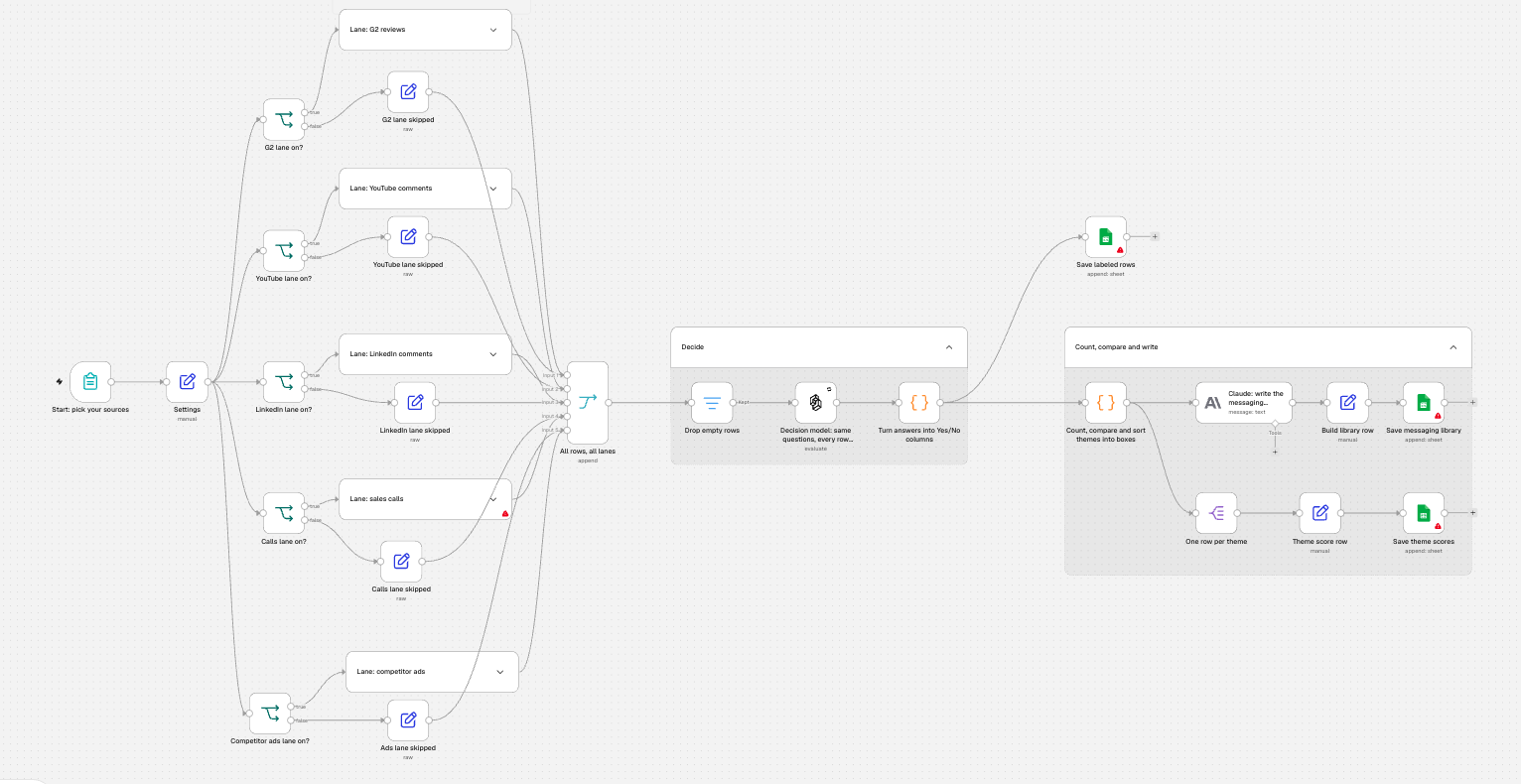
Screenshot of the template in n8n. The source lanes are collapsed.
Collect
Name your product on the form, then add G2, YouTube, or LinkedIn URLs. Paste call snippets into the Sheet if you have them. Skip any source you don’t have.
Decide
Every row gets the same questions. Is this a buyer? Do they mention price, setup, results, switching, support, AI or automation, integrations, or a missing feature? Are they complaining about it? Each answer becomes a yes or no column.
Count and rank
Code counts how often each theme comes up and how often buyers complain about that theme. Then every theme lands in one of four boxes.
Write
Claude takes the ranked themes and the buyer quotes behind them and writes the messaging library. Every quote is copied word for word, with its source.
Why the template uses Jev to analyze the feedback
Jev is a decision model from TypeSafe AI. It doesn’t write. It answers. Give it a review and a question like “Does this buyer complain about price?”, and it returns the probability that the answer is yes. The template counts 50% or more as a yes, so every review gets the same questions and a column of yeses and nos you can add up. A chat model gives you paragraphs, and you can’t count paragraphs.
- Answers you can count. One yes or no per question, per row.
- Cheap enough to read everything. Claire Vo reports Jev at 4 cents per million input tokens, with no charge for output.
- One question per theme. A review that complains about price and praises setup counts toward both.
Jev labels, code counts, Claude writes.
What you learn
What to say first, what to answer, what to skip
Every theme gets two numbers: the share of buyers who mention it, and how often those mentions are complaints about that theme. Those two numbers decide its box, and the box decides where it goes in your copy.
Cheat sheet: where each box goes in your copy
| Box | What it means | Where to use it | How to write it |
|---|---|---|---|
| Lead with | Buyers mention it a lot, and it’s mostly praise | Headlines, hero sections, subject lines, ad hooks | Use the buyers’ exact phrases |
| Answer head-on | Buyers mention it a lot, and 40%+ of mentions are complaints | FAQs, a P.S., testimonials, a sales slide | Name the worry, then show proof: a quote, a number, or a demo |
| Supporting proof | Mentioned less often, but true | Body copy, feature bullets, FAQs | One line or one quote is enough |
| Ignore | Under 5% of mentions | Leave it out of the copy | Pass it to product if it’s a product problem |
Answer a big complaint with proof, because “it’s easy!” won’t convince someone who’s read the reviews. Skip the rare ones: answering a complaint few buyers have can plant a doubt the reader never had.
Before you start
Six checks that save you later
- You connect your own Apify, TypeSafe AI, Anthropic, and Google accounts in n8n, and create a Sheet with the four tabs the template lists.
- The template needs two community nodes, Apify and TypeSafe AI. Check that your n8n setup allows them.
- Set Max rows to 5 for your first run, and paste only a few call snippets. Every row costs scraper and model credits.
- Spot-check the quotes the AI returns against the source.
- Review sites only hear from people who chose to write one, and the people who left rarely do. Add your own calls where you can. G2 reviews of other products are left out automatically.
- Check your data terms and customer contracts before you paste call transcripts into an AI tool, and check the terms of any site you scrape.
Free download
Get the template
Enter your email and the n8n template downloads right away.
Free. No account required.